







Web Hosting for Small and Home Based Business
Hosting plans for the novice to the veteran webmaster. Create your site offline and use your FTP or use the templates offered with our FREE Online Site Builder. Host up to three of your sites with the Corporate Account. Hosting your site has never been easier!


|
Video Tutorials
Click to View! |
| See for yourself how easy Site Studio is! |
| Getting Started |
| How to Edit a Page |
| Add an FAQ Page |
| Add Product Pages |
| Add a Download Page |
| Add Password Protection |
| Change Site Settings |
 With the Site Studio Online Site Builder, you can create your site in little time, freeing you up to do what you do best...run your business.
- No programming or HTML knowledge required
- No special software to buy
- Instantly make changes to your site from any computer
- Click here to view the templates.
Frequently Asked Questions:
Q: Do I need to download special software to run the Site Studio program?
A: No. An Internet connection, computer, and browser is all you need.
Q: Are there any additional charges for running the Site Studio?
A: No. The Site Studio program is included FREE with your hosting account.
Q: Can I use my own template in the Site Studio?
A: No. The program currently supports using templates that come with the program.
Q: Can I change the background color/image in the Site Studio?
A: Yes. While in the editing mode, click on the Settings tab. Here you can change the color or image of the background of your template.
Q: How to I activate the Site Builder?
A: Log in to your Control Panel. Scroll down to the Web Design Category and click on the Site Studio Icon. Once in the Site Studio Manager, scroll down and click the Activate button.
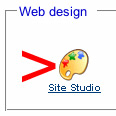 Site Studio Icon |
 Activate Site Studio Button |
Q: Is there an online Demo I can try?
A: Yes. You can find an online demo of Site Studio on the Postive Software site, the developers of the Site Studio program.
Please review the online help documentation and online tutorials before contacting Technical Support.
Articles :: Terms of Use :: Privacy Policy :: Contact

